EasySay · Audio to text
Transcription

Audio to text
right on your computer

Drop in a recording or a whole folder: an interview, a lecture, a podcast, a voice note. EasySay transcribes it on your computer, with no uploads and no per-minute fees.

macOS 14+ · Apple Silicon (M1 or later) · Windows 10 and 11

Why transcribe locally

Online transcription services charge per minute and require uploading your recording to their servers. For interviews, client calls, medical or legal conversations that is often not acceptable.

EasySay runs Whisper on your Mac or Windows PC. Recordings never leave your computer, and there is no length limit.

How to transcribe audio

  1. Download and open EasySay.
  2. Drop an audio file or a folder into Videos & Files.
  3. Wait for transcription to finish, progress is shown per file.
  4. Copy the text or open the transcript saved next to the original file.

Transcript and summary

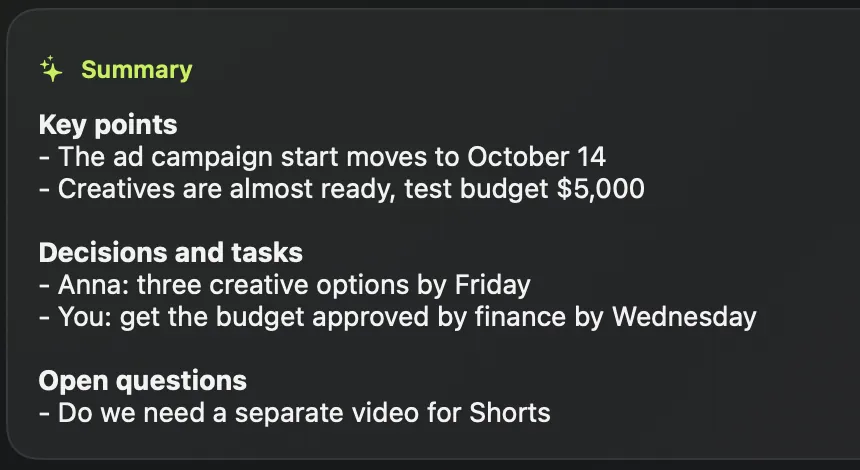
After transcription you can get a short summary: what was discussed, what was decided, what is still open.

  • MP3, M4A, WAV audio and MP4, MOV video
  • Hundreds of files at once, progress for each
  • Timestamped text and SRT subtitles
  • Summary and translation
Summary: key points, decisions and tasks, open questions
Questions
How accurate is it?

Whisper is one of the most accurate speech models available. Clean audio gives the best results, and you can add names and terms to your dictionary.

How much does it cost?

14 days with every feature, free, no account. Then a one-time purchase or a subscription, never per minute. See pricing.

Try it yourself

14 days with every feature, free. No account, no card.

macOS 14+ · Apple Silicon (M1 or later) · Windows 10 and 11